
Claude Code + NotebookLM: the research setup that pays for itself
Turn two tools into a research workflow — and save tokens while you're at it

There’s something I keep running into when I work with LLMs on anything substantial. I have a pile of source material — papers, transcripts, internal docs, whatever — and I want the model to reason over it. So I paste it into context. The chat slows down. The model starts forgetting what was at the top. By the third question I’m rationing tokens like wartime sugar.
The Claude Code + NotebookLM MCP setup is the first thing I’ve used that actually solves this, and not in a clever-workaround way. It just moves the problem to the right tool.

What the setup actually is
NotebookLM is Google’s tool for asking questions against a fixed corpus of sources you upload. It’s grounded — answers come with citations to the specific passages in your documents — and it’s free for individuals. The catch has always been that NotebookLM lives in a browser tab, isolated from whatever you’re actually trying to write or build.
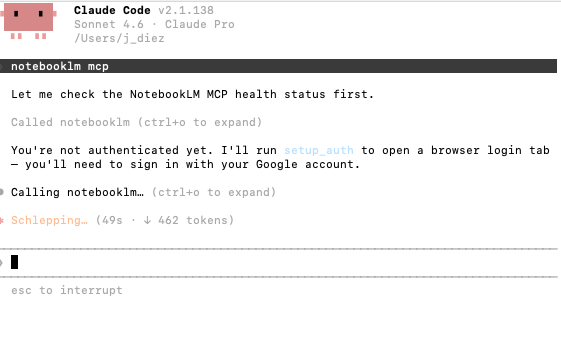
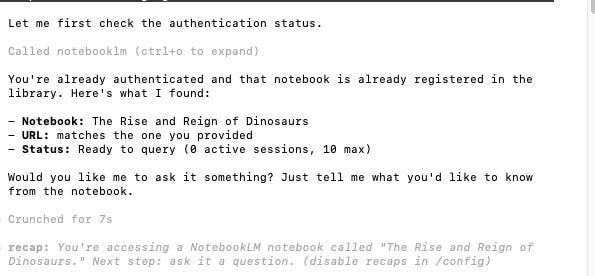
The MCP server changes that. Claude Code can now query your NotebookLM notebooks directly, get back citation-backed answers from Gemini, and use those answers as input to whatever it’s doing in your terminal. There are several implementations on GitHub; the install is roughly install, authenticate once with Google, register the MCP server with Claude Code. Five minutes if nothing goes wrong.
The token economics
When you paste a 200-page PDF into a Claude conversation, you’re paying input tokens for that document on every single turn. Ask five questions, you’ve sent the document five times. With the NotebookLM MCP, the document lives in NotebookLM. Claude only sees the answer that comes back — usually a few hundred tokens with citations, instead of the entire corpus.
For long research sessions this is the difference between hitting your usage limit at lunch and still having room at the end of the day. It also means Claude’s context window stays clear for the work you actually want it doing: writing, analysis, code. The reading happens elsewhere.
One honest caveat: MCP servers add tools to Claude’s context, and tools cost tokens too. The popular implementation by jacob-bd ships with around 35 tools, which is enough to noticeably eat into your window if you leave it on all the time. The same repo flags this and tells you to toggle the server off when you’re not using it (@notebooklm-mcp in Claude Code). Treat it like a power tool, not a permanent fixture.
Three use cases for people working with LLMs
1. Reading a long document without paying to re-read it. You drop a 300-page report, a court ruling, a textbook chapter, a stack of meeting transcripts into a NotebookLM notebook. Then you sit in Claude Code and ask whatever you want — what does this say about X, where does the author contradict themselves, summarise chapter 4 in plain language. Each question is a cheap call. You can spend an hour on a document for a fraction of what the same conversation would cost if the document were pasted into the chat.
2. Synthesis across sources you can’t fit in one prompt. Most useful research isn’t one document, it’s twenty. Ten papers on the same topic, a folder of customer interview transcripts, every blog post a competitor has ever published. NotebookLM holds all of it. Claude queries it. You can ask things like which of these sources disagree about the mechanism, and quote the disagreement — and get back a grounded answer with citations pointing to the exact passages, instead of a hallucinated summary stitched together from the model’s training data.
3. Drafting from your own knowledge base. This is where it stops being research and becomes production. You keep a NotebookLM notebook of your own writing, your meeting notes, your existing documentation — whatever counts as your stuff. Then when you’re drafting a new piece in Claude Code, the model can pull from that notebook to stay consistent with how you’ve talked about something before. It’s not impersonating your voice (it’s still Claude generating the prose); it’s making sure Claude has the actual facts of what you’ve previously said, instead of inventing a plausible version.
What this is and isn’t
It isn’t magic. The grounding only works if the documents in your notebook are actually the right documents. Garbage in, citation-backed garbage out. NotebookLM also has its own limits on notebook size and source count, which you’ll hit eventually if you’re feeding it large corpora.
What it is, though, is one of the few MCP integrations I’ve installed where I can point at the actual benefit instead of waving at the general idea of connecting things. Reading is offloaded to the tool that’s good at reading. Generation stays with the tool that’s good at generating. The token bill goes down. The hallucination surface shrinks because answers are grounded in real passages.
For anyone whose work involves regularly thinking against a body of source material — researchers, writers, analysts, lawyers, anyone with a folder of PDFs they keep meaning to read — this is worth the five minutes.
To show how simple this can be in practice, I built a little dinosaur game for my 5-year-old using Claude Code pulling from a NotebookLM notebook of dino facts. Here's the video.
This is an excellent idea. Thanks for sharing!
Genial. Gracias,Julia! Ahorrar tokens como si fuera azucar en tiempos de guerra 🤓